


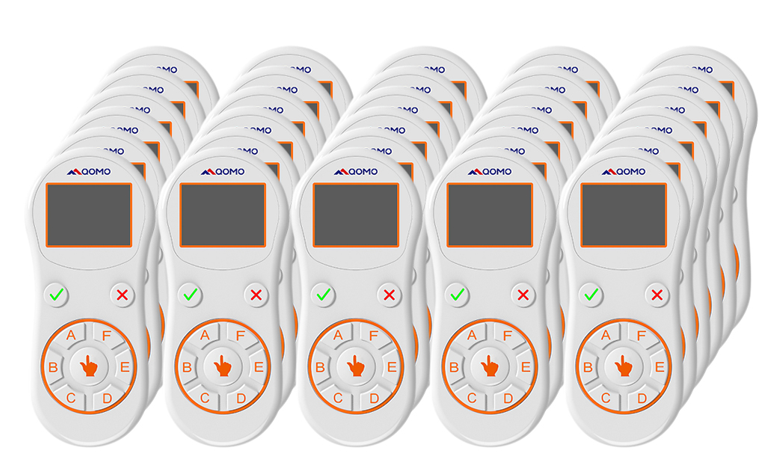
Cov Txheej Txheem Teb rau Cov Tub Ntxhais Kawm/ Cov Rooj Sib Tham Sib Tham
Lub kaw lus teb rau cov neeg mloog yog ib qho thev naus laus zis tshiab hauv kev ntsuam xyuas. Qhov no yog ib txoj hauv kev ceev tshaj plaws thiab yooj yim tshaj plaws los tshuaj xyuas kev ua tau zoo ntawm cov tub ntxhais kawm / cov neeg mloog.
Nws kuj tseem hu uakev sib tham sib xaiv tsa,lub kaw lus teb rau cov neeg tuaj saib, cov txheej txheem teb rau cov tub ntxhais kawm or kev sib tham sib teb cov lus teb rau kev kawm.Nws yog ib lub tshuab uas txhawb nqa kev koom tes hauv pab pawg thaum lub sijhawm sib tham, kev qhia hauv chav kawm, kev sib cav sib ceg, kev xeem ntawv lossis lwm yam kev sib tham. Lub tshuab no muaj ib lub xov tooj ntawm tes ntawm tus xib fwb, ib pawg xov tooj ntawm tes ntawm cov tub ntxhais kawm, ib lub receiver (uas siv thev naus laus zis xov tooj cua) thiab software ntsuam xyuas.
Hauv ib qhochav kawm sib tham sibib puag ncig, tus xib fwb nug ib lo lus nug los ntawm chav kawm los ntawm nws lub xov tooj ntawm tes thiab tom qab ntawd txhua tus tub ntxhais kawm hauv chav kawm teb rov qab los ntawm lawv tus kheej lub xov tooj ntawm tes. Cov software ntsuam xyuas ntes cov tub ntxhais kawm cov lus teb los ntawm lub receiver thiab tom qab ntawd tsim ib daim ntawv qhia ua daim ntawv teev, daim duab, daim duab ncuav mog qab zib thiab lwm yam. tus xib fwb tshem tawm qhov kev nkag siab yuam kev ntawm tus tub ntxhais kawm siv cov ntawv qhia Cov ntawv qhia no tuaj yeem tso tawm rau ntawm ib qholub rooj sib tham sib tham, plasma screen, LCD screen lossis ntawm txhua qhov chaw projection. Tus xib fwb tuaj yeem tswj txoj kev; daim ntawv qhia yuav tsum tau tso tawm los ntawm nws lub xov tooj ntawm tes (piv txwv li lub xov tooj ntawm tes tseem ceeb). Lub kaw lus no feem ntau siv hauv tsev kawm ntawv, tsev kawm qib siab thiab tsev kawm qib siab rau kev xeem, kev xeem, kev xeem thiab lwm yam.
Qomo Qclick yog ib lub tshuab xaiv tsa uas siv xov tooj cua los ua kev hloov pauv loj hauv kev ntsuam xyuas kev kawm. Qomo Qclick muab hwj chim rau cov xib fwb, cov kws qhia, thiab cov neeg nthuav qhia los ua kev ntsuam xyuas cov neeg mloog lossis cov lus teb hauv chav kawm rau ntau hom lus nug los ntawm Qomo Qclick. Qomo Qclick tsa cov qauv ntawm tus kheej los ntawm kev txhawb kom cov tub ntxhais kawm lossis cov neeg mloog koom nrog hauv kev kawm thiab kev sib tham kom ntseeg tau tias cov tub ntxhais kawm lossis cov neeg mloog nkag siab txog cov ntsiab lus.
Nws kuj tseem muab hwj chim rau Tus Xib Fwb / Tus Qhia los ua ib qho kev soj ntsuam, pov npav tsis qhia npe thiab lwm yam.
Cov Txheej Txheem Teb Cov Neeg Mloog kuj tseem siv tau los xaiv cov neeg sib tw rau kev xam phaj, es tsis txhob siv cov ntawv xeem, muab kev tshuaj xyuas tam sim ntawd ntawm cov txiaj ntsig thiab txuag lub sijhawm.
Peb muaj ib qho yooj yim version -QRF300C (tsis muaj LCD) thiab ib qho tag nrho version QRF888 / QRF999 / QRF997 (nrog LCD). Txais tos hu rau kom paub meej ntxiv yog tias koj xav tias txaus siab rau Qomo cov neeg tuaj saib teb system ..
Lub sijhawm tshaj tawm: Lub Peb Hlis-03-2022