


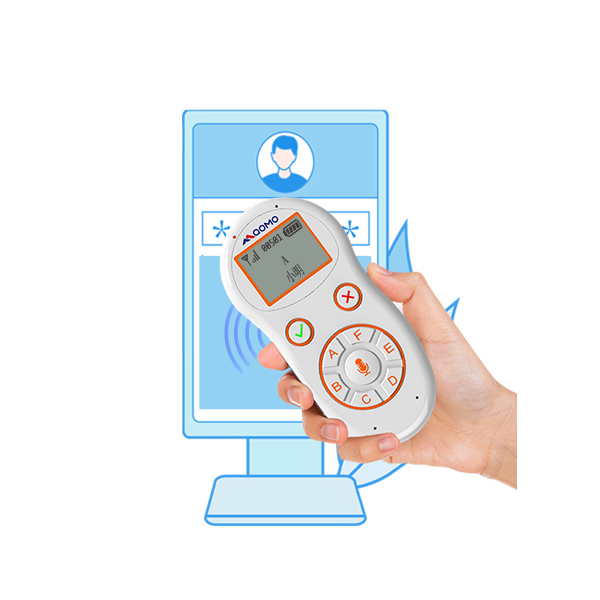
LubCov Txheej Txheem Teb rau Cov Tub Ntxhais Kawm(SRS) tso cai rau cov xib fwb nug cov lus nug thiab sau cov lus teb ntawm cov tub ntxhais kawm thaum lub sijhawm qhia ntawv. Cov txheej txheem teb ntawm cov tub ntxhais kawm kuj feem ntau hu ua clickers,cov txheej txheem teb hauv chav kawm, cov txheej txheem teb tus kheej, lossis cov txheej txheem teb cov neeg tuaj saib.
Ntawm Qomo, cov tswv cuab uas muaj teeb meem muaj ob txoj kev xaiv rau SRS. Ib qho yog lub kaw lus teb rau cov neeg tuaj saib uas muaj lub "clicker" (rau cov tub ntxhais kawm) thiab lub receiver (rau tus kws qhia); Qhov thib ob yog lub kaw lus teb rau cov neeg tuaj saib tsuas yog muaj cov chaw taws teeb tswj ntawm cov tub ntxhais kawm thiab lub receiver xwb.
Tus kws qhia ntawv tsim cov lus nthuav qhia sib tham hauv Qclick software uas tau teeb tsa rau hauv lawv lub computer.
Thaum lub sijhawm kawm, cov tub ntxhais kawm teb cov lus nug lossis teeb meem uas tau muab tso rau hauv kev nthuav qhia los ntawm kev siv lawv cov clickers. Lub receiver ntawm tus xib fwb lub computer sau cov ntaub ntawv thiab tuaj yeem tso saib cov ntsiab lus luv luv ntawm cov tub ntxhais kawm cov lus teb. Cov lus teb kuj tseem khaws cia hauv hluav taws xob rau kev saib tom qab.
Cov txiaj ntsig rau cov xib fwb
Tus neeg siv-phooj ywg interface
Muaj peev xwm ua haujlwm nrog txhua daim ntawv thov
Kev tso saib cov duab kos thiab cov duab qhia ntawm cov lus teb ntawm cov neeg siv
Kev txhawb nqa Microsoft Office sib xyaw ua ke
Cov ntawv qhia txog kev faib cov qhab nia, kev suav lej, thiab feem pua
Muaj peev xwm muab ntau lub rooj sib tham ua ke rau hauv ib daim ntawv qhia txog kev ua tiav
Kev tsim cov npe neeg koom nrog tsis siv neeg
Muaj peev xwm txhawb nqa cov txiaj ntsig tsis zoo
Tam sim no Qclick software txhawb nqa lus Askiv, Polski, magyar, espana, Suav thiab Lavxias. Peb tuaj yeem pab koj kom ua tiav cov lus uas cov neeg siv khoom xav tau. Qomo muaj tus kws tshaj lij Kev Tsim Kho thiab Kev Tshawb Fawb nrog ntau tshaj kaum xyoo dhau los uas yuav pab koj nrhiav qhov kev daws teeb meem zoo tshaj plaws rau koj.
Rau lwm txoj kev xaiv ntawm cov tub ntxhais kawm hauv chav kawm tswj hwm, Qomo muaj QRF888 cov lus teb rau cov neeg tuaj saib thiab QRF999 / QR997cov tub ntxhais kawm tswj chaw taws teebnrog rau kev xa lus uas tuaj yeem ua rau koj lub suab xa mus rau hauv chav kawm. Qhov ntawd yuav yog ib qho kev pab zoo rau kev kawm lus. Lub keypad me me uas haum rau tus tub ntxhais kawm lub xib teg me me. Lub caij no, nws yog lub chaw taws teeb them thiab koj tsis tas yuav txhawj txog thaum twg yuav tua hluav taws xob.
Currently, we have much stock for the audience student remotes, if you have special request, please feel free to contact email odm@qomo.com
Lub sijhawm tshaj tawm: Lub Kaum Hli-15-2021